0
[postlink]https://iamdaowner.blogspot.com/2012/07/5-tips-to-drive-lots-of-blog-readers.html[/postlink]
If you’ve ever created a blog before, then you know that the saying, “build it and they will come” just isn’t true. However, you can get more people interested in visiting your blog by following these five tips…
1. Offer good content.
By “good” content, I mean you should blog about topics that your audience wants to know about. To find out what they want, just follow these steps:
* Find out what types of information products they’re already buying – then write blog posts on the same topic.
* Use a keyword tool to find out what topics people in your niche are looking for.
* Drop by busy niche forums and other blogs to see which topics are generating the most views and discussion.
* Survey your readers to find out what they want.
2. Update frequently.
Sometimes people start a blog, post a flurry of articles and then abandon the blog for months at a time. If you allow dated posts, then your visitors aren’t likely to come back again if they notice that you don’t update regularly.
What you need to do is commit to posting to your blog at least once a week. If you don’t want to be chained to your blog like this, then create the content ahead of time and automatically “drip” it to your readers. Or, hire a ghostwriter to both create the content and post it.
Point is, you need to post often to keep your blog from looking like a deserted island.
3. Create regular features.
Here’s a great way to turn a one-time visitor into a repeat visitor. Specifically, by creating “regular features” and multi-part blog posts that your visitors can look forward to.
Example: Maybe you create a seven-part article about how to make money with pay per click marketing. And maybe you space it out so that you’re posting one or two articles per week. You can bet that your readers will return at least once a week just to finish reading the series.
Another way to get more visitors is by creating a regular feature, such as a “tip of the week” feature or even a “questions from our readers” feature.
4. Write about hot topics.
One way to get a surge of traffic and increase in your blog is by writing about hot or even controversial topics. You can include relevant keywords and “ping” the blog directories (like technorati.com) to make sure that those who are searching for the hot topic see your post.
Another way to leverage a hot topic is by joining in on the blogosphere conversation. Simply find a popular blog discussing a hot topic, and use a trackback to add your response.
5. Get someone influential to endorse your blog.
Finally, you can get others to visit your blog by first getting someone influential in your niche to endorse you (and your blog). You can do this indirectly, such as by offering to be a guest author on the other person’s blog. Or you can ask your joint venture partners to directly endorse you on their blogs and in their newsletters (and you’ll return the favor).
It’s free advertising. But it’s also extremely powerful, because you’re using social proof to increase your readership.
You just discovered five proven ways to get others to visit your blog – and to visit it again! Your next step is to take action.
Starting today, apply these tips… and then keep an eye on your traffic logs!
About the author: Hung Hong is a Mechanical Engineer from Vietnam.He spends most of his free time using internet and love to writing about Affiliate & Online Marketing, Blogging & Make Money Online. You can reach him through his personal website JVPrime.Com and HungMarketing.Com.

5 Tips To Drive Lots of Blog Readers

1
[postlink]https://iamdaowner.blogspot.com/2012/07/how-to-insert-adsense-code-in-blogger.html[/postlink]One of the known tips for improving the performance of your Google AdSense ads is knowing where to place the ads. In this guide, we shall discuss the modification you can make to your Blog template to have your Google AdSense ads appear between your post title and post body, or between your post body and post footer. Also, we shall have the AdSense ads appear on every individual post.

Choosing a best placement for your AdSense ads will attract more attention; attention leads to clicks; and clicks bring you AdSense revenue. Easier said. While people may have theories on where the ideal AdSense spot ought to be, there is really no standard answer because it depends very much on your Blog's layout, contents, theme, etc. If you have been following the changes made to our Blog, you would agree that we are no guru at this. We had merely placed the ads where they fit aesthetically and not where they will get the most attention. Nevertheless, if you would accept our two cents' worth of opinion, try to put yourself in the minds of your readers. Ask questions like why readers visit your Blog, which section of the Blog are they most interested in, and whether placing an ad at a particular area will distract, annoy or please them.

Many people believe that having AdSense ads just before or after the Blog posts will best optimize their performance. For the purposes of this article and to give you an idea how it would look, we have inserted the AdSense code into our template to have the ads appear immediately below the article and before the post footer. If you think you would like to do the same for your Blog, the following are the steps you should take.

Update: A section on Using Blogger Feature to insert the AdSense Ads after every post.

Using Blogger Feature

If you merely want an Ad to appear after every post or every few posts, use this Google feature instead. Go to Template -> Page Elements and you see in your layout the heading “Blog Posts”. Click the “Edit” link at the bottom right corner. You will see this screen.

We assume you have a Google AdSense account. If you don't, you can create one using the same login through your Google account. You will be assigned a Publisher identity number which shall appear in all your AdSense codes.

Tick the “Show Ads Between Posts.” You can select whether to show ads after every post or after several posts. In accordance with AdSense TOC, a maximum of 3 Ads will be displayed. Choose the ad format and color scheme. Save the changes and refresh your Blog to see the Ads.

While using this Blogger feature is simple and easy, you may want more control over the position of the Ads. For example, you may want it between the title and posts rather thanafter the posts. The following guide will show you how you can do that.

More Ad locations

Log in to your Google AdSense account.


Go to AdSense Setup -> Products and choose “AdSense for Content”.

Next, select “Ad unit” and follow their instructions on picking the size of ad, color combination, and so on, right till the end when they automatically generate a HTML code for you. Copy this code and paste it into Microsoft Notepad. (If you are a WinXP user, click the Start button at the bottom left corner of your screen. Under All Programs -> Accessories, you should see the MS Notepad icon.)


Change the AdSense code

This heading may sound misleading. We are not at all altering the code but converting some of the characters to character entities. We have to parse the AdSense code so that it can be included into your Blog template. This is not against AdSense rules because after the code is inserted into the template, when you view the source code of the template, you should see the exact same AdSense code that Google has generated for you. Indeed, if it is anything different, it means that you have not parsed it correctly and should review the code again. Parsing the code essentially involves replacing the following HTML characters:-

< with &lt;
> with &gt;
" with &quot;

Your final Google AdSense Code should look something like this:

- You could use this tool : Encode

&lt;script type=&quot;text/javascript&quot;&gt;&lt;!--
google_ad_client = &quot;pub-0000000000000000&quot;;
google_ad_width = 336;
google_ad_height = 280;
google_ad_format = &quot;336x280_as&amp;amp;quot;;
google_ad_type = &quot;text&quot;;
google_ad_channel = &quot;&quot;;
google_color_border = &quot;FFFFFF&quot;;
google_color_bg = &quot;FFFFFF&quot;;
google_color_link = &quot;000000&quot;;
google_color_text = &quot;000000&quot;;
google_color_url = &quot;000000&quot;;
//--&gt;&lt;/script&gt;
&lt;script type=&quot;text/javascript&quot;
src=&quot;http://pagead2.googlesyndication.com/pagead/show_ads.js&quot;&gt;
&lt;/script&gt;

Insert code into template

Login to your Dashboard. Go to Template -> Edit HTML and click the box next to “Expand Widget Templates”.


 Block copy the entire HTML code for your site that you presently have and save it in a separate text file in MS Notepad. You can also click the "Download Template" link to backup the template. This is one of the two necessary steps whenever you want to change the template. The second step is to “Preview” the new changes, and save the changes only when you are satisfied. The backup you have saved in a text file will come in handy when you accidentally click to save the changes without previewing them. With a backup, you can easily restore the template to the prior state if need be.

Now search for post.body through your browser's search function (Ctrl+F for Firefox and IE). You should see these lines:

<div class='post-body'>
<p><data:post.body/></p>
<div style='clear: both;'/> <!-- clear for photos floats -->
</div>

If you want the AdSense ads to appear between the post title and post body, add the following codeabove the orange lines. If you want the AdSense ads to appear immediately after every individual post, add the following code below the orange lines. The code to add is:

<div style='float:left;'>
AdSense Code
</div>

The AdSense Code is the one you have amended above in MS Notepad. Do NOT save the template, but click the Preview button to see if you like the placement of the AdSense ads.

Do you want to have the AdSense code on the left of your text as shown in this screenshot?


Choose the smallest AdSense format like 125x125. Insert the AdSense code here:

<div class='post-header-line-1'/>
<div style='float:left;'>
AdSense Code
</div>
<div class='post-body'>
<p><data:post.body/></p>
<div style='clear: both;'/> <!-- clear for photos floats -->
</div>

If you want the Ads on the right of the text, like this:


Insert the code as follows:

<div class='post-header-line-1'/>
<div style='float:right;'>
AdSense Code
</div>
<div class='post-body'>
<p><data:post.body/></p>
<div style='clear: both;'/> <!-- clear for photos floats -->
</div>

Set the AdSense ad margins

If your AdSense ads are too close to the edge, you may set a margin in the style tag. To give you an idea how wide the margin should be, you can see the sample in our other Business Fables blog where the left margin is set to 30px. The code used was:

<div style='float:left; margin-left:30px'>
AdSense Code
</div>

Should you want to align the AdSense ad to your text, you can specify a margin or padding around the entire AdSense code. The code you can use is:

<div style='float:left; margin:5px 10px 15px 20px'>
AdSense Code
</div>

The first number 5px is for the top margin, 10px is for the right margin, 15px for the bottom margin, and 20px for the left margin. You should of course change these values to suit your template.

Preview the template and if you are satisfied, save the template and refresh your Blog to see the new positions of your AdSense ads.

Have a good blog!

How to Insert AdSense Code in Blogger Post Body

0
[postlink]https://iamdaowner.blogspot.com/2012/07/6-free-seo-friendly-blogger-templates.html[/postlink]
It’s overwhelming when you have to select from thousands of free blogger templates. They come in all sizes and shapes. SEO friendly. SEO unfriendly, three column, two column, column less and what not?
One mistake most of the new bloggers commit is to pick up a fancy template. It’s appealing, bright, full of colors and there’s that large background picture of your favorite movie star. For a human eye – it’s appealing.But one important factor was missed there – how would it affect you in the long run? And how good is the template for search engines? (OK that makes it two questions.)
It’s very important to ensure that your template(fancy or not) is Search Engine friendly.And with all the junk templates available on a simple google search, it’s easy for a newbie to pick up a bad template.
If you’re looking for SEO friendly WordPress themes (which are far more SEO optimized),check this collection.
Here’s a list of top SEO friendly templates for blogger. They were all tested for SE friendliness, Cross browser compatibilities and general appeal.

6 free SEO friendly blogger templates

0
[postlink]https://iamdaowner.blogspot.com/2012/07/6-best-free-blogger-templates-with.html[/postlink]
One of the popular features of Blogger Blogspot Templates is the Featured Post Slider or Slideshow Carousal. Today I was searching on internet and best free blogger templates. SO I get and idea of presenting some of them with best jquery content slider and much more features. Here are 5 Best Free Blogger Templates With jQuery Content Slider All the Sliders are created with jQuery which allows some cool features such as the transitions (The effect between each slide).

I had placed all link to download and live demo in image. Click On The Screenshot Of Each Template For The Demo and Download Details.

Glow - Free Premium Blogger Template

Glow has a beautifully constructed Featured Slider Slideshow.The slides are visible as thumbnails on the left of the full size slider.The template also has a glowing two column magazine design with right sidebar.

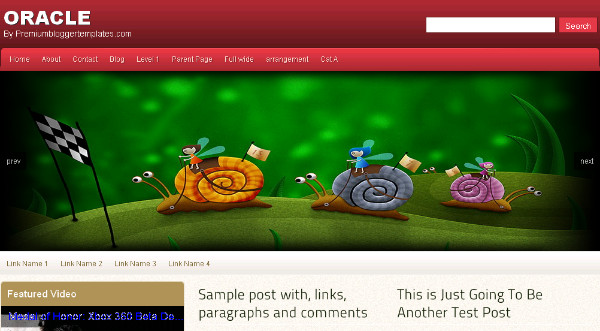
Oracle - Advanced Magazine Blogger Template

Oracle has a beautifully fitted Featured Slider, Image Slideshow with the sides fading away.The slides auto scroll with a manual scroll option.The template also has a two column magazine design with a left sidebar.

Oracle - Advanced Magazine Blogger Template

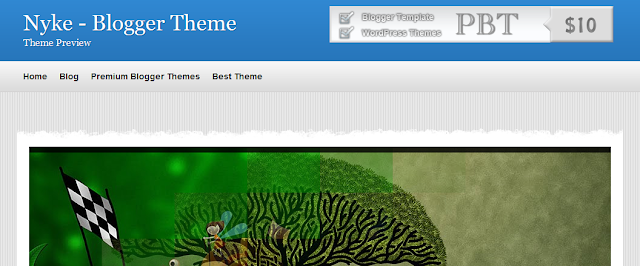
Nyke - Magazine Blogger Template

The Featured Slider, Image Slideshow has a very unique rounded bottom and a number of coll transitions between images.The template has a two column layout with right sidebar.

Nyke - Advanced Magazine Blogger Template

MoonLight - Clean Magazine Blogger Template

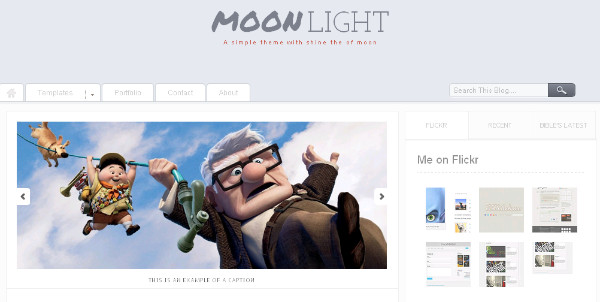
MoonLight - Clean Magazine Blogger TemplateThe Featured Slider, Picture Slideshow on Moonlight has a more simple design but fits neatly above the posts with auto scroll and manual scroll options.The template has a minimalist design with two columns and a right sidebar.

MoonLight - Clean Magazine Blogger Template

 Calenotis - Photographers Magazine Blogger Template

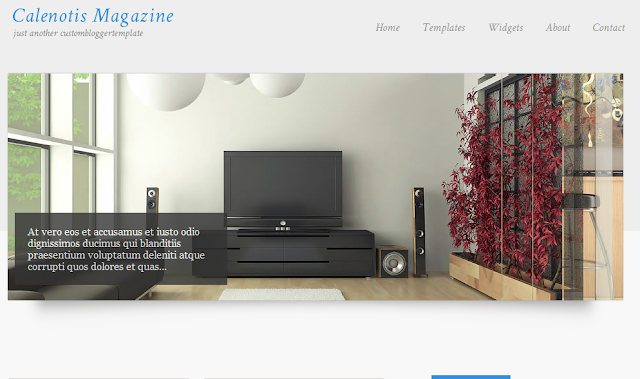
Calenotis has a beautiful full width Featured Slider Slideshow that has a 3D design.The slides are on auto scroll with a number of different transitions.The template also has a professional magazine design with a two column right sidebar layout.

Calenotis - Photographers Magazine Blogger Template

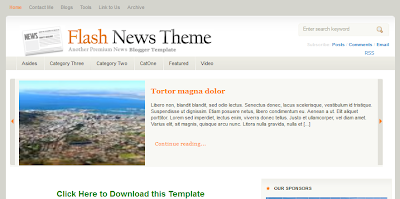
Flash News Blogger Template


Flash news was my last choice (but not least). I found it is very professional blogger template but HackTutors readers haven't covered too much interest on it. Its stylish header may attract your visitor.

Nyke - Advanced Magazine Blogger Template 

6 Best Free Blogger Templates With jQuery Content Slider

0
[postlink]https://iamdaowner.blogspot.com/2012/07/download-premium-blogger-templates-free.html[/postlink]Download Premium Blogger Templates Free 2012

Blogger Template Premium paid or now the majority of free or free to download. Unlike the WordpressPlatform also provides a free addition to providing a template that has the advantage because pay is better than blogger.

Premium Blogger Template versions are usually more cool, nice and has advantages in terms of appearance, design and other, often more people are targeting the template is yes because the advantages that are different from others. example: Simple Blogger Template 2012. Below is the version Template Tukang Coding obtained from a google search and did its Premium and Free for the download. By: DeluxeTemplates.net

Please visit the Download heart's content. would be directly applicable, ato for collection no problem, other times tau greet change your mind or I'm bored with the current template. oia, do not forget to comment.


1.Sens Blogger Template

Linksens-blogger-template

DOWNLOAD

2. Shoppica Blogger Template 

shoppica-blogger-template

DOWNLOAD

3. BeautyTravel Blogger Template 

beautytravel-blogger-template

DOWNLOAD

4. NewiPad Blogger Template 

newipad-blogger-template

DOWNLOAD

5. BeautyMusic Blogger Template 

Download Premium Blogger Templates Free 2012

0
[postlink]https://iamdaowner.blogspot.com/2012/07/elegant-blogger-template-download-best.html[/postlink]Elegant Blogger Template Download Best and Latest

Elegant Blogger Template version is also frequently discussed by the bloggers to apply to their blog, Template Elegant and simple this is usually minimal when the eye is also nice. These templates are usually in the download for those who prefer the look is simple but attractive and easily accessible to visitors.

Elegant Template Tukang Coding show below that this template is slightly different from other previously Tukang Coding posting the 2012 Best Cute Blogger TemplatesBlogger Templates and Template Gallery Photo 2012 covered this time is almost similar to the post Download Free Blogger Template jQuery because it will also be included with jQuery effects are more smooth and the core of the posts are in the top slider to automatically change the type of news every few minutes / seconds all dependent on the settings on each slide change.

Here are the Elegant Templates for Blogspot are ready to download for you guys who like the simple and certainly worth a look. by: btemplates.com


1. Elite Minima
live demo

DOWNLOAD


2. Creativa
live demo
DOWNLOAD


3. WpStudio


4. Versatile
live demo

DOWNLOAD


5. deStyle

Elegant Blogger Template Download Best and Latest

0
[postlink]https://iamdaowner.blogspot.com/2012/07/download-anime-blogger-templates-free.html[/postlink]
Download Anime Blogger Templates Free 2012

Blogger Templates Anime or cartoon version of the Japanese state is also a favorite of bloggers to display their blog. Diverse background template with the typical cartoon Sakura is available for download for those who enjoyed the type of template Anime like Bleach, Naruto, Sailor Moon, and so forth.

Template of this type are usually loved by women and not a few of the men also eyeing this template as one of their favorite anime. According to Tukang Coding, these templates are available from 2 to 3 columns karna relied more Anime pictures that are in the display backlight or background.

Anime version of Blogger is in contrast to the previous post blogger templates Blogger Template Photo Gallery 2012 or the Magazine Blogger Templates and more similar to the post The Best Cute Blogger Templates 2012 which also rely on cartoon appearance. the location of this difference is clearly of the view that further leads to a Japanese cartoon or anime

Anime Blogger Template below is available for download and of course free and can be directly applied to the respective blogger. please download as much and do not forget to comment. by: btemplates.com

1. Bleach
live demo

DOWNLOAD


2. Naruto Fight


3. Anime Heaven v2
live demo

DOWNLOAD


4. AnimeLight
live demo

DOWNLOAD


5. Sailor Moon
live demo

DOWNLOAD

    Download Anime Blogger Templates Free 2012

    0
    [postlink]https://iamdaowner.blogspot.com/2012/07/download-blogger-templates-jquery-free.html[/postlink]Download Blogger Templates jQuery Free 2012

    JQuery to Blogger template is a template that includes the effects in the form accompanied by slides and so forth. Templates are usually very nice and looks luxurious compared with the blogger template that looks generally mediocre and a very stiff compared to the themes that comes with jQuery in it.

    Not a few are using the Blogger template type is due to other advantages than others, the effect is more smooth and the accompanying image is no less interesting is also part of this jQuery templateSimple templates are different from the 2012 Blogger Template, Blogger Template Photo Gallery 2012 and 5 Best Blogger Template SEO Friendlybecause as said earlier Download this jQuery Blogger Templates relies more on the effect looks.

    Ok, so enough Down to brass tacks, silahakn in the download as much, klo want to replace it immediately wrote the template for the collection of ato just yes please and do not forget to comment. by: http://www.spiceupyourblog.com and http://www.bestbloggertemplates.net

    1. Modern Photography


    3. Mahasoli Tribune


    DOWNLOAD


    4. Namisan


    DOWNLOAD


    5. Ocenolis Magazine

    Download Blogger Templates jQuery Free 2012

    0
    [postlink]https://iamdaowner.blogspot.com/2012/07/download-unique-blogger-template-free.html[/postlink]Download Unique Blogger Template Free 2012


    Template for Blogger Template Unique or Unique version of XML is one target of the many templates that blogger in the download to view them. This type of template looks pretty unique and interesting and different than the look of bloggers in general.

    Unique templates usually rely on the view that eccentric but interesting to be accessed or viewed, and in it contains a lot of code like CSS and the latest CSS3 and CSS3 is aTukang Coding know only supported by browsers such as Mozilla, other browsers such as IEChrome and Safari are not or are not support the implementation of CSS3.

    Not only CSS3 is injected in a unique XML template coding, the effect also jQuery is one more weapon to make the display of the Template Unique differently than most. TreTan probably already know the what and how if jQuery is applied on the blog and its effects-even vary depending on how the coding of jQuery and post Download Free Blogger Template jQuery is one example of the application of jQuery coding.

    Here are some Unique to Blogger Template Tukang Coding version is ready for download. by: btemplates.com


    1. X5 Shadow

    live demo

    DOWNLOAD


    2. Magaling


    3. X7 Blue Black


    4. Simple Clean white


    5. Blue One Coloumn

    Download Unique Blogger Template Free 2012

    Grab the widget  IWeb Gator
    Powered by Blogger.

    Click the Like Button Below To Receive all updates via Facebook

    Powered By Blogger Tricks |

    Popular Posts